![White Teledentix Logo.png]](https://help.teledentix.com/hs-fs/hubfs/White%20Teledentix%20Logo.png?height=40&name=White%20Teledentix%20Logo.png)
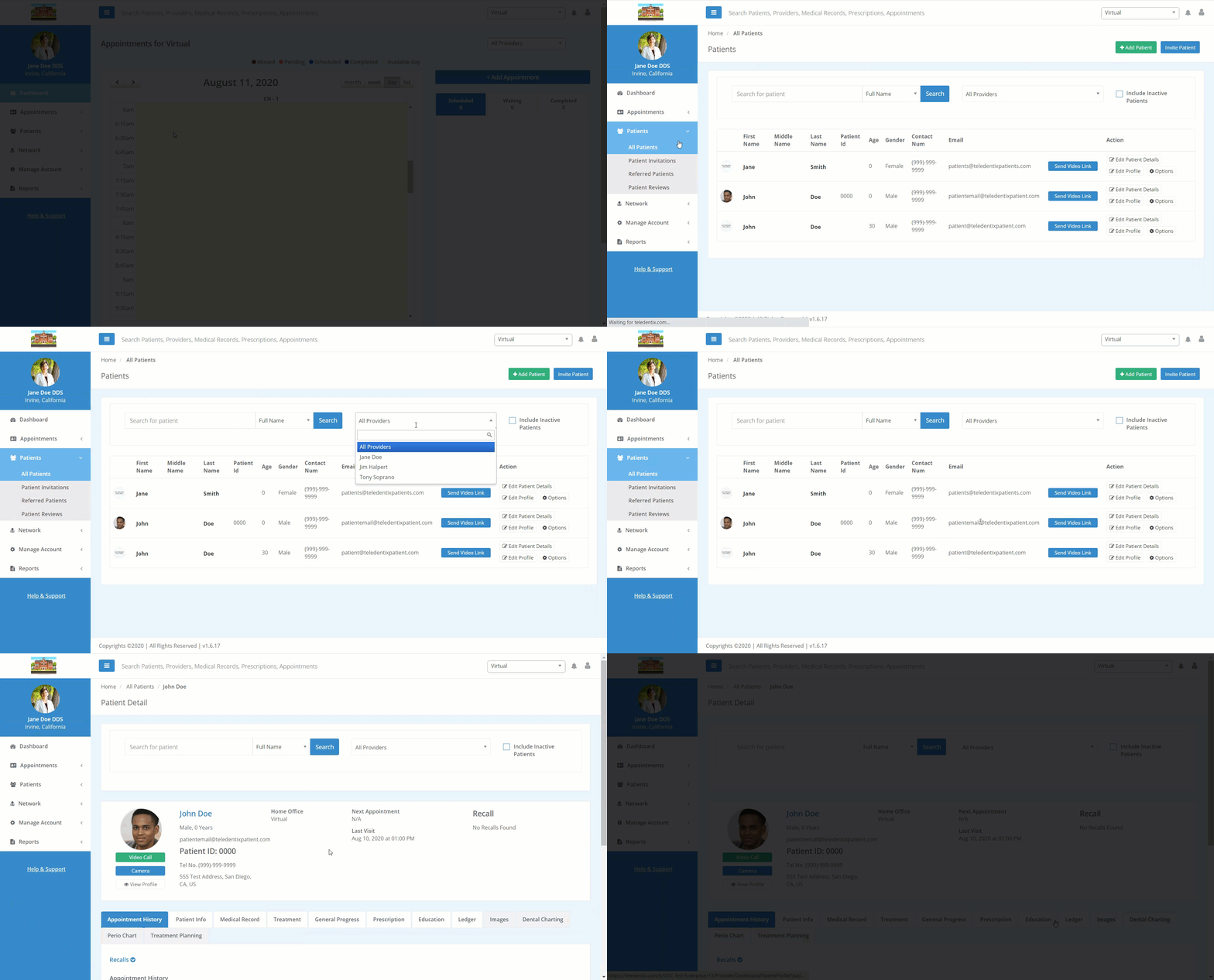
A patient's Patient Details page allows you to view the details of a patient's information, history, and reference materials from a single page. Patient details include: appointment history, medical records, treatment, progress notes, prescriptions, etc.
To view or edit a patient's Patient Details:
- Select "Patients" from the dashboard list on the left-hand side of the screen.
- If your patient has an appointment scheduled, you can also click the appointment to access the Patient Details page.
- Select "All Patients" from the drop-down list.
- Using the prompts in the center screen, search for your desired patient and click "Edit Patient Details" under the Action column on the right-hand side of the screen. Additionally, you can click their photo or name to click into their Patient Details page.
- Selecting the appropriate tab on this page, you can view and edit their Patient Details.