![White Teledentix Logo.png]](https://help.teledentix.com/hs-fs/hubfs/White%20Teledentix%20Logo.png?height=40&name=White%20Teledentix%20Logo.png)
In order to set up payments in Teledentix:
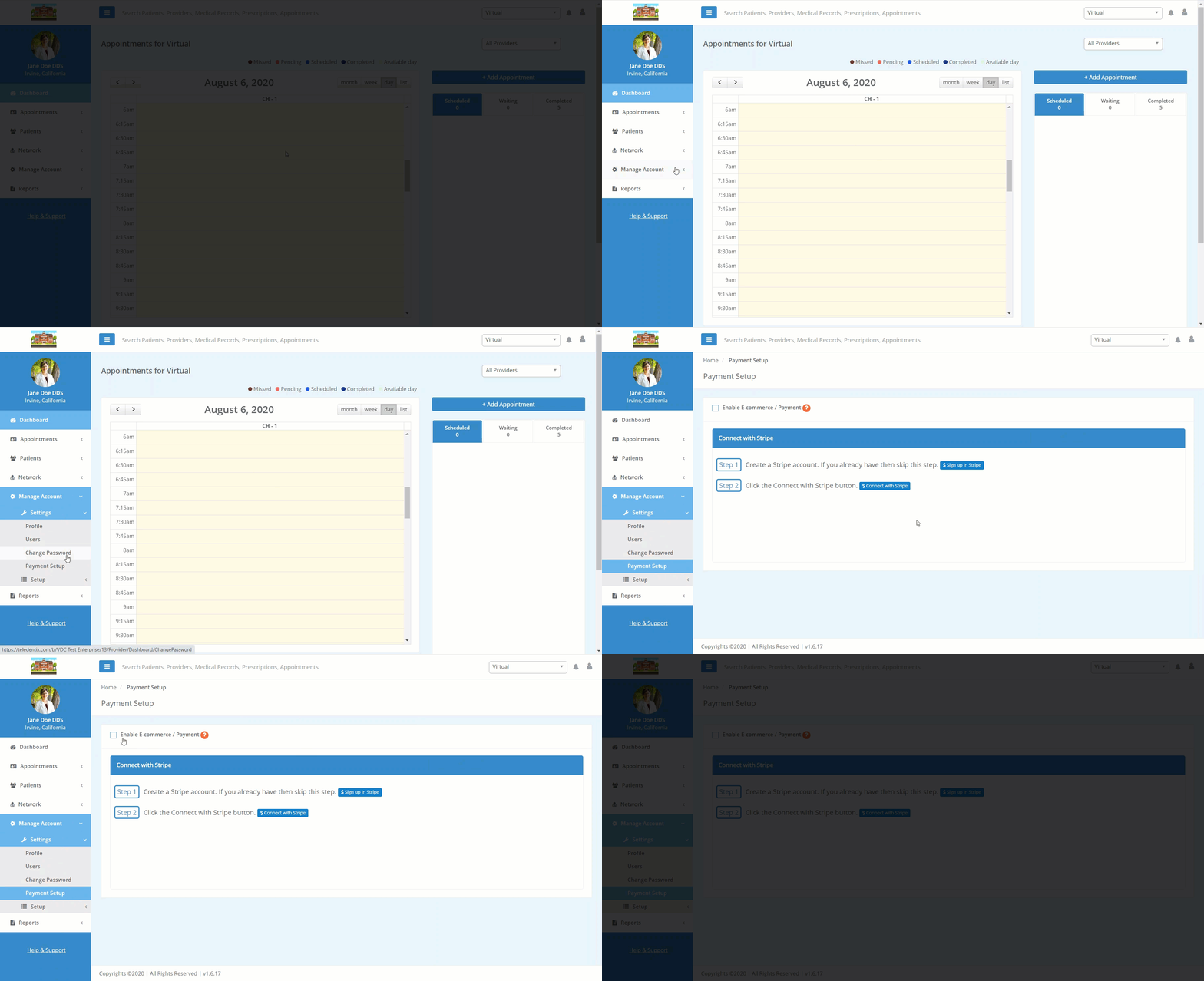
- Select "Manage Account" from the dashboard list on the left-hand side of the screen.
- Select "Settings" from the drop-down list.
- Select "Payment Setup" from the drop-down sub-list.
- In the center of the page, follow the steps to create and link your Stripe payment platform account.
- Register for a free Stripe account with your email here.
-
- You can find more support for your Stripe account at Stripe Support.
- Stripe offers access to their payments platform starting at 2.9% + 30 cents per successful card charge. Learn more about their billing practices by clicking through to Stripe's pricing details.
- You can find more support for your Stripe account at Stripe Support.
- After you have connected your Stripe account, check the "Enable E-commerce / Payment" box to confirm.
Note: Enterprise clients must have Stripe set up on individual provider accounts to allow for the specified provider to take payment.